Remote Control
Remote control
Producer itself can be controlled by an external software. The current show can thus be changed remotely, different sequences can be triggered...
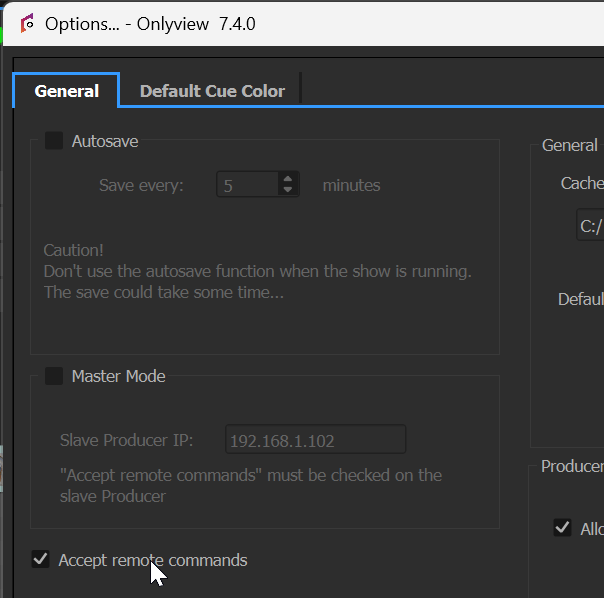
"Accept remote commands" must be checked in Producer options (File -> Producer options).
In the content tab, the status icon will turn green when the control software connects, and red when the connection is lost.

It is also possible to directly control a Media Server, if it acts as a Producer (Cluster Master or Solo; see the "Standalone Media Servers" section). In this case, only the following actions are executed: Pause, Loop, Timeline Actions (except lock / unlock timecode), Screen Action. Other actions are ignored.
Network protocol
Producer listens for TCP/IP connections on port 3055.
-
Command are utf-8 encoded. The replies too.
-
Commands are terminated by a 0x0A character ('\n'). A 0x0D 0x0A ('\r\n') line ending is accepted too.
-
Arguments are separated by "*"
loadshow*path_to_olv [M]
Loads a show.
Ex: loadshow*c:\\test.olv
Does not automatically put all the Media Servers online.
play*timelineID*timecode [M][S][C]
Plays a specific timeline at the given timecode. If the timecode is omitted, the timeline continues from its current position. The timecode is expressed in one of these formats:
-
In milliseconds. Ex: 90480
-
HH:MM:SS:mmm, with mmm in milliseconds. Ex: 00:01:30:480
-
tc=HH:MM:SS:FF, with FF in frames. Ex: tc=00:01:30:12
-
tc=HH:MM:SS. Ex: tc=00:01:30
The tc= format uses the framerate of the show, like the timecode shown on the timeline. Fractional framerates are rounded down: 29.97 is counted as 29 frames per second, without drop frame. An invalid timecode is ignored, and a warning is logged.
Ex: play*1*1000 plays timeline 1 at 1 second.
Ex: play*1*tc=00:01:30:12 plays timeline 1 at 1 minute, 30 seconds and 12 frames.
locate*timelineID*timecode [M][S][C]
Locates a timeline at the given timecode, and pauses it. The timecode uses the same formats as play.
setgrandmaster*timelineID*position*fadetime [M][S][C]
Executes a fading of a timeline's GrandMaster.
position: Between 0 (black) and 100 (full).
fadetime: transition time in milliseconds.
Ex: setgrandmaster*3*100*4000 : timeline 3 fades in, in 4 seconds.
settimelineon*timelineID*on [M][S][C]
Turns a timeline on or off.
on: 0 for off, 1 for on.
resetblind*timelineID [M][S][C]
Resets all the layers' blinds on a timeline
setlayerblind*timelineID*type*layerID*state [M][S][C]
Blinds or unblinds a layer.
type: 0 for command layers, 2 for media layers.
state: 1 for blind, 0 for normal
resetsolo*timelineID [M][S][C]
Removes all the solo flags on the layers of a timeline
setlayersolo*timelineID*type*layerID*state [M][S][C]
Sets a layer in solo mode.
type: 0 for command layers, 2 for media layers.
state: 1 for solo, 0 for normal
launchquickkey*quickkeyID [M]
Executes a quickkey
online [M]
Producer only. Puts all the Media Servers Online.
offline [M]
Producer only. Disconnects from all the Media Servers
shutdownmaster [M]
Producer only. Turns off the computer.
rebootmaster [M]
Producer only. Reboots the computer.
timelinestate*timelineID [M][S][C]
Returns the state of a timeline.
Ex: timelinestate*4 will send back timelinestate*4*[on]*[timecode]*[gm]*[playstate]*[name]
on: 0 for off, 1 for on
timecode: the timecode in milliseconds
gm: the grandmaster between 0 and 100, rounded to an integer.
playstate: 0 for pause, 1 for play
name: the name of the timeline. It is always the last field, and it can contain "*".
positiontimeline*timelineID [M][S][C]
Returns the timecode of a timeline.
Ex: positiontimeline*4 will send back positiontimeline*4*[timecode]
timecode: the timecode in milliseconds
boardstate*boardID [M][S][C]
Returns the state of a board.
Ex: boardstate*2 will send back boardstate*2*[on]*[timecode]*[gm]*[playstate]*[sequence]*[enqueued]*[enqueuedpreset]*[duration]*[name]
on: 0 for off, 1 for on
timecode: the timecode in the current sequence, in milliseconds
gm: the grandmaster between 0 and 100, rounded to an integer.
playstate: 0 for pause, 1 for play
sequence: the current sequence, counted from 0. -1 if none.
enqueued: the enqueued sequence, counted from 0. -1 if none.
enqueuedpreset: the preset forced for the enqueued sequence, counted from 0. -1 if none.
duration: the duration of the current sequence, in milliseconds. -1 if it has no end, 0 if it is empty.
name: the name of the board
screenstate*displayID [M][S][C]
Returns the status of a Media Server
Ex: screenstate*4 will send back the state of Media Server #4 : screenstate*4*[state]*[name]
state: 0 if never connected yet; 1 if disconnected; 2 if connection in progress; 3 if connected; 4 if error.
name: the name of the Media Server
setpattern*num [M][S][C]
Shows a test pattern on all the Media Servers.
Id=0 : None
Id=1 : Small Test Pattern
Id=2 : Horizontal Black Level
Id=3 : Vertical Black Level
Id=4 : Chessboard
Id=5 : Onlyview Logo
Id=6 : SMPTE HD ColorBar
Id=7 : SMPTE SD ColorBar
Id=8 : OSD
Id=9 : CPU performance
Id=10 : GPU performance
Id=11 : Flat color
The Small Test Pattern accepts two optional arguments: the line width in pixels, and the border color.
Ex: setpattern*1*4*#ff0000 shows the Small Test Pattern with 4 pixel lines and a red border.
The Flat color accepts four optional arguments: red, green, blue and alpha, between 0 and 255. Without them, the color is opaque white.
Ex: setpattern*11*255*0*0*255 shows an opaque red.
State subscription
Instead of polling timelinestate, boardstate and screenstate, a client can subscribe to the state of the show. Producer then sends the changes by itself.
subscribe*1 [M]
Subscribes to the state of the show. The 1 is the version of the protocol. Producer ignores a subscribe with another version, and logs a warning.
Producer first sends subscribed*1, then the full state of the show:
-
showframerate*[fps]: the framerate of the show. Ex: 25, or 29.97.
-
For each timeline: timelinestate (see above), then one timelinelayerstate per layer.
-
For each board: boardstate (see above), then one nameboardsequence per sequence, then one boardlayerstate per layer.
-
For each Media Server: screenstate (see above).
-
For each quickkey: quickkeystate.
Several messages can come in the same TCP packet. Each one ends with '\n'.
After that, Producer checks the show every 100 ms. It only sends the messages that changed. A timelinestate or boardstate message is not sent again while the timeline or board plays normally: the client must advance the timecode by itself. It is sent again on a play, a pause, or a locate.
When the structure of the show changes (a timeline, board, layer, sequence, Media Server or quickkey is added or removed), or when its framerate changes, Producer sends subscribed*1 and the full state again. The client must then forget its old state. There is no message for a removed object.
"Accept remote commands" must be checked. If it is unchecked, all the clients are unsubscribed.
Not supported yet when a Media Server acts as a Cluster Master.
unsubscribe [M]
Stops the messages of subscribe. Closing the connection does the same.
timelinelayerstate*timelineID*type*layerID*blind*solo
Sent by Producer only, after subscribe. The state of a timeline layer.
type: 0 for command layers, 2 for media layers.
blind: 1 for blind, 0 for normal
solo: 1 for solo, 0 for normal
nameboardsequence*boardID*sequence*name
Sent by Producer only, after subscribe. The name of a board sequence.
sequence: counted from 0.
boardlayerstate*boardID*layer*blind*solo
Sent by Producer only, after subscribe. The state of a board layer.
layer: counted from 0.
blind: 1 for blind, 0 for normal
solo: 1 for solo, 0 for normal
quickkeystate*quickkeyID*name
Sent by Producer only, after subscribe. The name of a quickkey.